
 If you follow our blog (and why wouldn’t you?!), you may have spotted our recent piece about pitching for business on Linkedin. Well, there was so much more to say about this incredibly powerful social media platform that we decided a follow-up piece was in order!
We’re going to dig a little deeper into how to optimise your Linkedin profile and grow your network with new connections and followers.
Creating a “connect with me” profile
We’ve talked about the importance of a profile photo, an attention grabbing headline and a decent ‘About’ section. So, what else can you do to transform your Linkedin profile into an algorithm-friendly connection magnet?
Here are a few ideas:
Add a cover image
When someone clicks on your profile, a well-chosen cover image can instantly communicate what you’re all about. Here’s Gary’s – you can see straightaway that he’s a social media expert who delivers public talks (and really likes purple). Someone who’s interested in learning more about social media now has a reason to explore Gary’s profile in more detail.

Use keywords in your headline
We talked about headlines in the previous piece, but one extra thing you can do is tweak the text to include keywords, e.g. “social media trainer”. The algorithm can then pick these up when people are running relevant searches, putting your profile in view of interested prospects.
Ask for recommendations
Recommendations are the one part of your profile not written by you: as such, they can be very influential. Ask everyone who’s worked with you to write you a recommendation, as the more endorsements you can collect, the stronger the trust signals you’re sending to people who don’t know you yet.
Feature your best content
If you have posts that have performed especially well, or which mark important business milestones, add them to your ‘Featured’ section. This will turn them into a carousel of highlighted posts, which someone exploring your profile can quickly browse through. Much like the cover image, this gives them a quick way to get a handle on who you are and what sort of thing you like to talk about on Linkedin.

Setting up a company page
Ideally, you won’t just have a personal profile, you’ll have a company page too. In fact, if you want to run any paid ads on Linkedin, you’ll need one.
Even though company pages don’t get as much visibility on Linkedin as personal profiles, it can still be a good idea to set one up as you can then share ‘branded’ posts to your personal network. It also means any staff or contractors you hire can list themselves as employees, which exposes your brand to their networks as well as your own.
Follow or connect?
Even the best Linkedin profile will struggle to attract connections on autopilot. You will gain new followers and connection requests if you consistently post engaging content (look out for a future post about this!), but you also need to be proactive in seeking out the people who fit your target customer base.
Use Linkedin’s powerful search function to find these people: run a keyword search, e.g. “marketing manager”, and then refine it using ‘All Filters’.
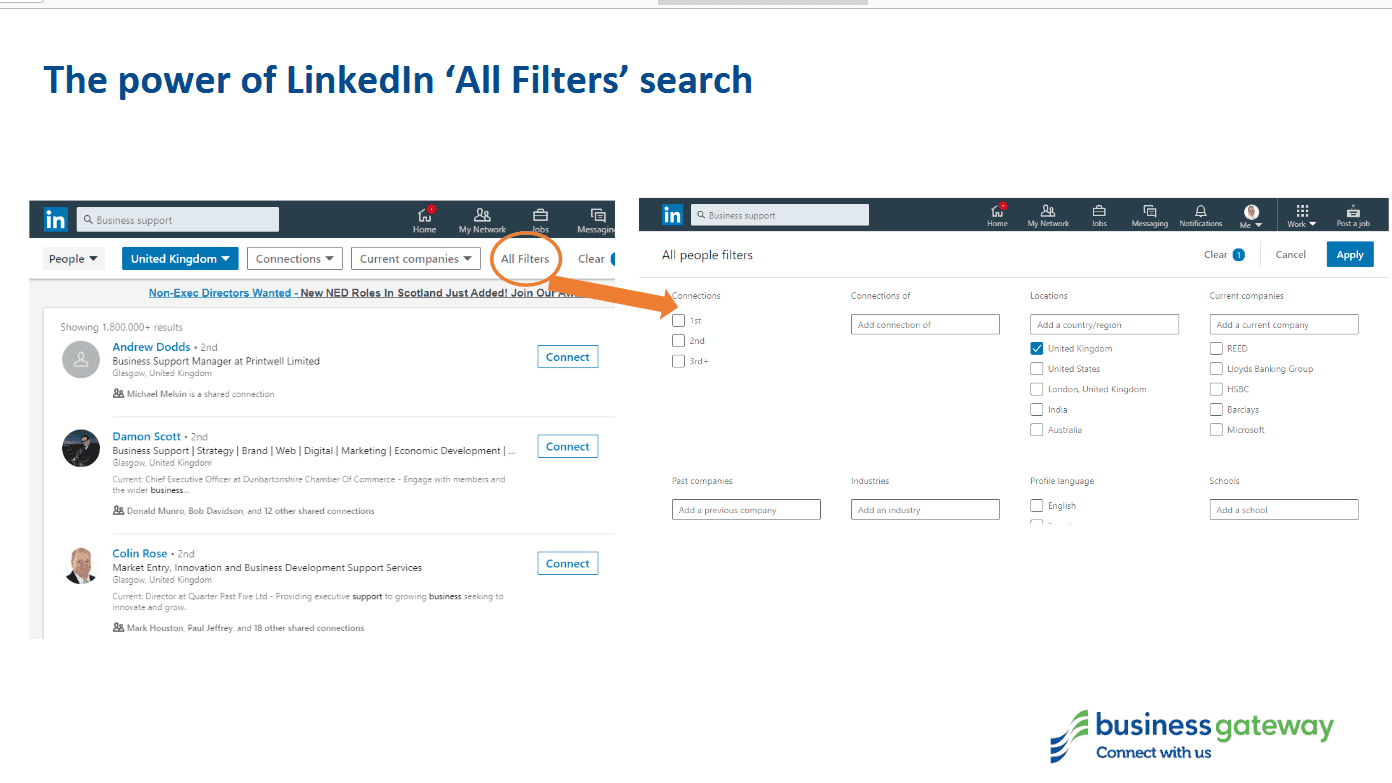
Usually, you have two options when you want to add someone to your network: follow or connect. If you’re using the free version of Linkedin, you can send up to five personalised connection requests per month, but if you want to send more, you can send them without a note.
Sending connection requests automatically adds you as a follower of the account, even if they reject your request. By that logic, you may as well ask to connect, as you’ll be able to see their content either way, and if they accept there’s a chance they’ll see yours too!
As with all marketing, consistency is key. Set up a routine of sending, say, 5 connection requests twice a week (be strategic – don’t just spam-connect with anyone and everyone), and posting original content once a week. Over time, you’ll see your follower and connection count expand. As your network grows, you’ll find it easier to get more visibility for your business on Linkedin … which is why you’re on the platform in the first place!
If you’d like to sharpen your digital skills further, then get booked onto one of our digital marketing webinars, buy the bestselling social media book, or give us a shout!